
Core Web Vitals: Fix LCP, CLS & INP in 2026
Core Web Vitals in 2026: How to Fix LCP, CLS and INP
A website can look amazing, but slow loading times, delayed interactions and shifting elements can annoy visitors. Website owners measure these real-world experiences using Largest Contentful Paint, Interaction to Next Paint and Cumulative Layout Shift, collectively known as Core Web Vitals.
Improving Core Web Vitals may support better usability and overall website performance optimization. These metrics remain an important element of Google Page Experience, although they are not the only factor affecting search visibility.
Learn the Three Core Web Vitals
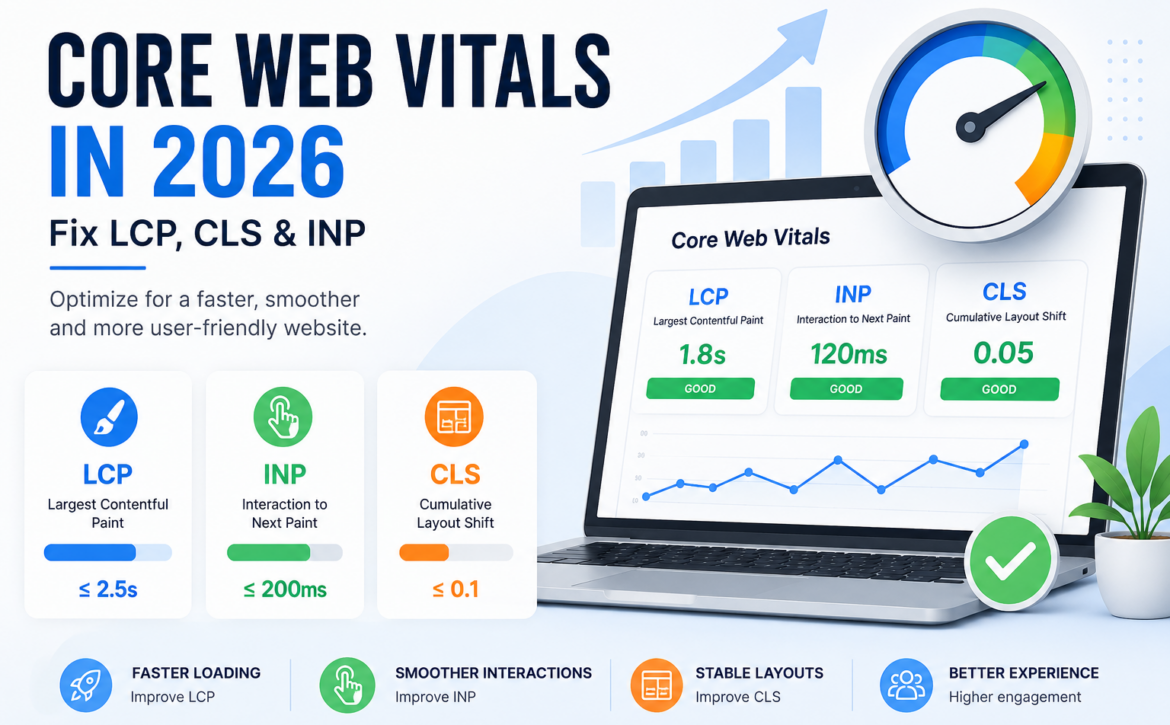
Largest Contentful Paint measures the time it takes for the main visible content to load. Interaction to Next Paint measures how quickly a page responds when someone clicks, taps or types. Cumulative Layout Shift measures how much content unexpectedly moves as the page loads.
For a good user experience, businesses should generally aim for:
- LCP of 2.5 seconds or less
- INP of 200 milliseconds or less
- CLS score of 0.1 or less
Businesses can also review the official Google Core Web Vitals guidance to better understand how LCP, INP and CLS are measured.
Improve Core Web Vitals Through LCP Optimization
The first step in improving LCP is identifying the largest visible element. This is often a hero image, banner or heading section. Compress large images, use modern formats such as WebP or AVIF, preload important assets and improve server response times.
Removing render-blocking resources and using dependable hosting may also support faster loading.
Strengthen INP Optimization
Heavy JavaScript, long browser tasks and complex third-party scripts often lead to poor INP. Reduce unused JavaScript, divide large tasks into smaller processes and avoid loading unnecessary tracking tools.
Buttons, menus, forms and filters should respond quickly on both mobile and desktop devices.
Apply Practical CLS Fixes
Unexpected page movement often occurs when images, advertisements or embedded content load without reserved space. Add width and height attributes to visual elements, avoid inserting content above existing sections and preload important fonts.
These CLS fixes can make browsing more stable and predictable.
Test Core Web Vitals With Real User Data
Google Search Console, Chrome DevTools and PageSpeed Insights can help identify website speed optimization problems. Review both laboratory test results and field data, as real visitors may use different devices, browsers and network connections.
Avoid Common Optimization Mistakes
Do not optimize one metric at the expense of the complete user journey. Too many plugins, oversized sliders, unoptimized mobile layouts and unnecessary scripts can still slow a website down after basic fixes.
Regular WordPress Website Maintenance can help identify unnecessary plugins, performance issues and outdated website components.
How Digital Labz Can Help
Digital Labz offers web design, Search Engine Optimization and WordPress maintenance services to businesses in Kitchener, Waterloo and Cambridge. Its team can assess performance issues, optimize WordPress components and help improve Core Web Vitals across existing websites.
Improve Core Web Vitals for a Faster Website
Businesses that improve Core Web Vitals can provide faster loading, smoother interactions and more stable pages. Speak with Digital Labz about website performance optimization and creating a better experience for your visitors.
